F150 Tremor FORScan

Not 100% sure if this is a Forscan change or what, but figured worth a shot.

I have a Wolfbox dash cam with the OBD2 power supply. It cuts out about 45 minutes into my drive and goes into a reboot cycle, eventually correcting itself for an unknown amount of time before going into the reboot cycle again. We are now on a road trip towing our travel trailer so we are in tow haul mode and the issue is no longer present. I noticed the alternator output remains in the 13s so this could be why it's staying on or the power supply to the OBD2 port is different/constant in tow haul mode, not sure.

So, is there a mod in forscan for changing the obd2 power feed? I believe I saw a mod to change the alternator output, but I'd prefer not to do that.
 
They’ve worked for most everyone…you sure you did it right? LOL
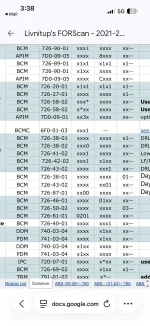
lol I think so but maybe not. See when I look at FORScan on my computer when plugged in to truck it doesn’t show these numbers like this on screen?? Is there a way to get it to show the numbers
 

Attachments

  • IMG_6464.webp
    IMG_6464.webp
    115.6 KB · Views: 8
Not sure if this has been asked already but does making changes using forscan jeopardize the warrannty?
 
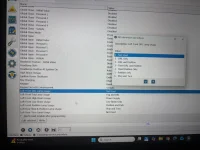
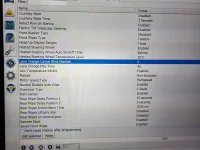
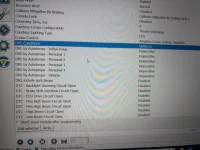
I was in FORScan again this morning just to double check. This is what I see in there. Says DRL include park lamps is enabled already but they are not on with DRL 🤷🏻‍♂️. Wonder if these other options for left front DRL lamp usage work??
 

Attachments

  • IMG_6466.webp
    IMG_6466.webp
    255.9 KB · Views: 14
  • IMG_6467.webp
    IMG_6467.webp
    209.9 KB · Views: 7
New here. I have a 2026 F-150 Tremor 402A, built in July, and I've been working through some of the FORScan changes available for these trucks.

I've had success with most of the changes I've tried, but there are a few that either don't work or give me a security key error and abort the change. I'm wondering if some of this is because this is a 2026.

A few specific issues:

Bambi Mode:
I was only able to get this working through the Clear English path. Direct modification of the configuration didn't work. However, when I use Clear English, it also remembers the fog light setting, which I would prefer it not to do.

Walk-Away Lock:
I couldn't get the Walk-Away Lock toggle to appear in the truck's menu. I tried resetting the module using the hard buttons and also locking the truck and waiting 10+ minutes, but the menu option still didn't appear. I eventually changed the configuration so Walk-Away Lock is permanently enabled, but I'd really like to have the actual menu toggle available.

Turn Signal Flashes:
This is the one I really want to change. I'm trying to modify the number of turn-signal flashes for a lane change. When I attempt to write the change to the SCCM, I get the security key error and the change is aborted.

I'm wondering if the SCCM security requirements are different on the 2026 models, or if I'm simply using the wrong configuration/address.

Has anyone with a 2026 F-150, especially a July-built truck, gotten these three things working?
  1. Bambi Mode without having the fog-light setting remembered
  2. Walk-Away Lock with the actual menu toggle
  3. Changing the lane-change/turn-signal flash count through the SCCM
Any help or confirmed 2026 values would be appreciated. I'm especially interested in hearing from anyone who has actually made these changes on a 2026.

Here are the changes I've made via As-Built:

System / ModuleFeatureAddress LineOriginal Values (Stock)New Values (Saved)Outcome / StatusNotes
IPC (Gauge Cluster)Door Ajar & Startup Chime720-01-02022F 90EB xxxx020F 92CD xxxxSUCCESS: Door chime and triple startup ding are muted.
IPC (Gauge Cluster)Key-in-Ignition Chime720-02-016DE5 3905 1ED86D65 3905 1E58SUCCESS: Mutes the rapid dinging when door is open with key in slot.
IPC (Gauge Cluster)Quick Boot Animation720-07-018401 8EA0 0DEF8401 8EA0 0DEFREVERTED: Firmware ignored the skip command; safely restored to factory stock.Did not work
SCCM (Steering Column)Turn Signal Blink Count724-01-010800 8C2D EE0800 8C2D EESKIPPED: Module threw a security access timeout block; left stock.
ACM (Stereo Headunit)Fake Engine Sound (ESE)727-01-013003 14F5 107C3003 14F5 006CSUCCESS: Simulated exhaust pumped through speakers is disabled.Re-enabled, back to stock
BdyCM (Body Control)Walk Away Lock (Part 1)726-89-020000 0000 00B80101 0101 01B8SUCCESS: Proximity tracking activated.
BdyCM (Body Control)Walk Away Lock (Part 2)726-90-010000 0000 00BE0101 0000 00BE (or 0001)SUCCESS: Feature forced permanently "On" at the main computer level.
APIM (Sync Touch Screen)Walk Away Lock Toggle7D0-09-050015 0160 207B0015 0160 207BREVERTED: Sync 4 blocked the menu layout slider; restored to factory stock.
 
I was able to get the flashers to change on my 26. I will hook up the computer tomorrow or Monday and get you the info.
 
I'm sorry, I forgot. I will check within the hr
 
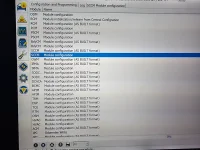
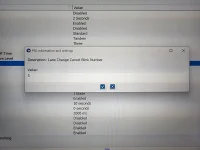
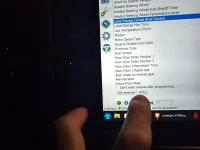
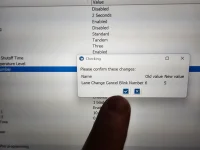
Module SSCM, lane change cancel blink number
 

Attachments

  • 17890738420538453557666578150115.webp
    17890738420538453557666578150115.webp
    169.8 KB · Views: 15
  • 17890738623588575409448360737532.webp
    17890738623588575409448360737532.webp
    139.6 KB · Views: 15
  • 17890738856554639860503906870285.webp
    17890738856554639860503906870285.webp
    60.8 KB · Views: 16
  • 1789073903137614979456078503384.webp
    1789073903137614979456078503384.webp
    105.6 KB · Views: 14
  • 17890739352458557102386709491229.webp
    17890739352458557102386709491229.webp
    53.2 KB · Views: 18
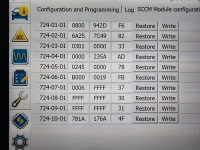
SSCM (AS BUILT)
 

Attachments

  • 17890741877563474313113208229205.webp
    17890741877563474313113208229205.webp
    237.3 KB · Views: 11
That's what I tried. I can make those changes but get an error when I try to write the change to that module.
 
It's the latest and greatest version of Forscan. I'm using the OBDLinkEX cable. I can modify any other module just not SCCM.
 
New here, just picked up 2023 402A and interested in glare free, is there any way to do it on 23’s? Seems like updates may have taken it out and the tables now say it doesn’t work on 23’s. Apologize if this has already been talked about I haven’t made it through all 43 pages yet.
 
Back
Top