What's new

F150 Tremor FORScan

Maybe not completely dead, but we may have to try a few things to see if we get lucky.

What do you have OEM in this (*) position:
720-02-01xxxxxxxx*x--
My work laptop isn’t near me right now but I happened to find this back on page 6 of this convo. This is factory programming

It’s 1

Currently this is the only change we’ve made

You can test changing to: 720-05-01 xxxx xxxx 04 - -
 

Attachments
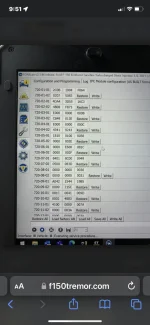
  • 71D21E48-7E7E-4C9F-92EF-E9E207768B89.webp
    71D21E48-7E7E-4C9F-92EF-E9E207768B89.webp
    103.2 KB · Views: 81
Last edited:
My work laptop isn’t near me right now but I happened to find this back on page 6 of this convo. This is factory programming

It’s 1

Currently this is the only change we’ve made

You can test changing to: 720-05-01 xxxx xxxx 04 - -
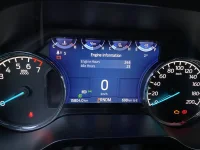
There also appears to be a setting related to 10k oil life monitor in 720-02-01. I’m wondering if a change there coupled with the change you already made in 720-05-01 has an effect. If not we may be sunk. It very well maybe controlled by the PMC and essentially hard coded as well.
 
There also appears to be a setting related to 10k oil life monitor in 720-02-01. I’m wondering if a change there coupled with the change you already made in 720-05-01 has an effect. If not we may be sunk. It very well maybe controlled by the PMC and essentially hard coded as well.
Do you think there's anything i should try out?
 
Do you think there's anything i should try out?
One more thing to try:
leave the previous change as is, then change:

IPC
720-02-01 xxxx xxxx 0x-- (OEM should be 1)

This is labeled as 10K Oil Minder (Enabled / Disabled). I would then do a reset on the IPC using the wrench icon in forscan to force a restart. I am hoping this causes the Oil Minder to follow the strategy we set with the previous change you made. It might however cause the Oil Minder to disappear from the menu. If the latter happens just change it back to 1 and do another reset.

I'm out of ideas for moment if that has no effect.
 
One more thing to try:
leave the previous change as is, then change:

IPC
720-02-01 xxxx xxxx 0x-- (OEM should be 1)

This is labeled as 10K Oil Minder (Enabled / Disabled). I would then do a reset on the IPC using the wrench icon in forscan to force a restart. I am hoping this causes the Oil Minder to follow the strategy we set with the previous change you made. It might however cause the Oil Minder to disappear from the menu. If the latter happens just change it back to 1 and do another reset.

I'm out of ideas for moment if that has no effect.
I’ll give this a go thanks a lot!
 
One more thing to try:
leave the previous change as is, then change:

IPC
720-02-01 xxxx xxxx 0x-- (OEM should be 1)

This is labeled as 10K Oil Minder (Enabled / Disabled). I would then do a reset on the IPC using the wrench icon in forscan to force a restart. I am hoping this causes the Oil Minder to follow the strategy we set with the previous change you made. It might however cause the Oil Minder to disappear from the menu. If the latter happens just change it back to 1 and do another reset.

I'm out of ideas for moment if that has no effect.
Welp as you predicted @Robb1 it made the oil minder disappear so I changed it back. Really had my hopes up on that one.

Any chance you can hold my hand on this part? im very confused on the part where it says to set ModuleFeatureCfg_RBA (MFCRBA) to disabed i looked everywhere and cant seem find that

Disable auto-reverse-braking and the alert that lets the driver know the driver toggled it off.
IPMA706-01-01xxxxxxx*xx--set ModuleFeatureCfg_RBA (MFCRBA) to disabed - if your default is 9 then use 8, if your default is 5 then use 4
 

Attachments

  • E598051F-FE5D-4BEE-AA6C-AF7BEFED894C.webp
    E598051F-FE5D-4BEE-AA6C-AF7BEFED894C.webp
    155.5 KB · Views: 92
Last edited:
Welp as you predicted @Robb1 it made the oil minder disappear so I changed it back. Really had my hopes up on that one.

Any chance you can hold my hand on this part? im very confused on the part where it says to set ModuleFeatureCfg_RBA (MFCRBA) to disabed i looked everywhere and cant seem find that

Disable auto-reverse-braking and the alert that lets the driver know the driver toggled it off.
IPMA706-01-01xxxxxxx*xx--set ModuleFeatureCfg_RBA (MFCRBA) to disabed - if your default is 9 then use 8, if your default is 5 then use 4
I was afraid that might be the case. Out of ideas for the moment on the oil minder, but if I run across anything in the future I will let you know.

The reverse braking is fairly straight forward:

Check what you have currently in: 706-01-01 xxxx xxx* xx- -

If you have a 9 then change to 8
or
If you have a 5 then change to 4

The above will disable the reverse braking. What you are actually doing in the software by changing that digit is disabling (MFCRBA).

If you have something besides 9 or 5 in your factory as-built let me know and we can find the correct alternate.
 
Hey y’all, is there a way to disable the rear parking sensors and beeps? I’m getting really tired of it going off when my MTB is hanging over the tailgate. So many dang beeps!
 
Hey y’all, is there a way to disable the rear parking sensors and beeps? I’m getting really tired of it going off when my MTB is hanging over the tailgate. So many dang beeps!
Pretty sure you can do that in one of the menu options on the center screen. I’ll try and go look later this evening
 
I was afraid that might be the case. Out of ideas for the moment on the oil minder, but if I run across anything in the future I will let you know.

The reverse braking is fairly straight forward:

Check what you have currently in: 706-01-01 xxxx xxx* xx- -

If you have a 9 then change to 8
or
If you have a 5 then change to 4

The above will disable the reverse braking. What you are actually doing in the software by changing that digit is disabling (MFCRBA).

If you have something besides 9 or 5 in your factory as-built let me know and we can find the correct alternate.
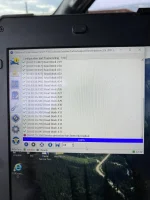
Alrighty @Robb1 Here’s what pops up every time I try and change it from a 5 to the 4. It kicks me out of that module. Tried it a few times and also tried to reset the module with no luck.

Thanks again for all your help
 

Attachments

  • 0C67EE50-F9C0-48E6-9B12-1139B2C3A6DF.webp
    0C67EE50-F9C0-48E6-9B12-1139B2C3A6DF.webp
    247.6 KB · Views: 67
Last edited:
Alrighty @Robb1 Here’s what pops up every time I try and change it from a 5 to the 4. It kicks me out of that module. Tried it a few times and also tried to reset the module with no luck.

Thanks again for all your help
That’s forscan acting up. Your module software version isn’t in the data base for that version of forscan most likely.

Looks like you are using 2.3.46 currently.

First try the newest release version: https://forscan.org/download/FORScanSetup2.3.48.release.exe

If that doesn’t do the trick try the beta version: https://forscan.org/download/FORScanSetup2.4.6.beta.exe
NOTE: stay away from the module firmware update capability in beta. I don’t recommend anyone tinker with that recreationally.
 
Last edited:
Hey y’all, is there a way to disable the rear parking sensors and beeps? I’m getting really tired of it going off when my MTB is hanging over the tailgate. So many dang beeps!
Try disabling the rear in the menu Features > Driver Assistance

960E497E-B4A8-4F56-BA48-C4D23F4CCB30.webp

5966CEE2-2599-43B1-928A-B593A147CB9D.webp
 
@ robb1 Problem solved! Thanks!
 
That’s forscan acting up. Your module software version isn’t in the data base for that version of forscan most likely.

Looks like you are using 2.3.46 currently.

First try the newest release version: https://forscan.org/download/FORScanSetup2.3.48.release.exe

If that doesn’t do the trick try the beta version: https://forscan.org/download/FORScanSetup2.4.6.beta.exe
NOTE: stay away from the module firmware update capability in beta. I don’t recommend anyone tinker with that recreationally.
Thanks!
 
Anyone know what all of the options for Personal 1, 2, 3, and 4 are? See a lot of them in the BdyCM module, for example. Is that like a Driver, Passenger, Rear 1, Rear 2, type thing?
 
I have made a few FORScan mods to date and have been testing additional mods for the Tremor specifically. I have enabled the digital gauges, bambi mode, auto start / stop disable and most recently enabling Glare Free / Adaptive driving lights.

I have completed the testing and confirmed error free operation for the glare free / adaptive adaptive beams. For those not aware the 402A (sorry everyone else) is equipped with adaptive driving beam capable head lights. Unfortunately they are disabled in the US trucks due to some outdated laws manufactures are limited by. Our friends in Canada and Europe get the more advanced system active by default, while we are stuck with auto high beams instead.

This is a slightly more complex FORScan mod due to multiple modules involved, but fairly simple once you are familiar with FORScan. Please backup you modules before making changes!

For those interesting in enabling this cool tech here are the as-built changes required (402A ONLY):

In the list below do not change the values in your as-built represented by "x"

Glare Free Menu (replaces Auto High beam) in APIM:
7D0-09-01 x1xx xxxx
7D0-09-03 xxCx xxxx
Note: a module reset in FORScan or power cycle is required for the menu to appear.

IPMA
706-01-01 xxxx xxx9

SCCM
724-04-01 xxx4 xxxx

IPC
720-01-01 xx8x xxxx
720-10-01 xxxx xxx3

HCM
734-01-01 xxxx xx01
734-01-02 x3xx xxxx
734-01-04 xx53 4E
@Robb1
I enabled all these setting and went for a test drive tonight. This feature is really nice. Thank you!!!

Does seem that the headlights are react A LOT fast when turning the steering wheel left or right now. Almost twitchy, guess it depends on how you jerk the steering wheel.

Anyone else notice this more aggressive headlight movement reaction to slight turning, etc with Glare-free enabled???
 
I have a new one for the crew:

Auto Heated and Cooled seats.

This will adjust the heating and cooling of the seats automatically based on internal truck temp and selected climate control temp. You retain the ability to manually control via the buttons. You also get a on center screen indicator of you selection and whether you are in auto mode or not.

You need auto climate control and heated / cooled seats for this to work. I have only tested on my 402A.

Note: I just sorted this mod out tonight and did some brief testing. Everything seems to work well, but I haven't completed long-term testing, your mileage may vary. It works well.

HVAC
733-01-08 xxxx x1xx xx

APIM
7D0-02-02 1xxx xxxx xx

Preform a module reset via the wrench icon on the APIM after writing both changes.


View attachment 1663
@Robb1
Made the above changes in my 2022 402A.
Features work great for the auto functions for the seat heat and cool but us with 2022 and newer trucks have 1 issue with the change.

Issue: Those with 2022 and newer trucks do not have the digital temp read outs in our A/C control knobs like you do. So that means at a glance I no longer have my temperature Setpoint shown in the upper left and upper right as of my display screen with this change. It’s changed to your 2021 display layout See below photo.

Can you help get those temperature setpoints to display in the upper left (driver) and upper right (passenger) again with this auto heat/cooled feature enabled for us with 2022 and newer trucks?
F737F71B-DE3E-4B4A-AD69-9F274D304677.webp
 
@Robb1
Made the above changes in my 2022 402A.
Features work great for the auto functions for the seat heat and cool but us with 2022 and newer trucks have 1 issue with the change.

Issue: Those with 2022 and newer trucks do not have the digital temp read outs in our A/C control knobs like you do. So that means at a glance I no longer have my temperature Setpoint shown in the upper left and upper right as of my display screen with this change. It’s changed to your 2021 display layout See below photo.

Can you help get those temperature setpoints to display in the upper left (driver) and upper right (passenger) again with this auto heat/cooled feature enabled for us with 2022 and newer trucks?
View attachment 5412
I also have a 2022 402A. I made this change

APIM
7D0-02-02 5xxx xxxx xx

Changing the 1 to a 5 will give you the desired result.
 
Doubt the ability to mod via forscan is this granular, but any way to stop the nav's searchbar keyboard from being disabled while the vehicle is in motion?
 

Recent Discussions

Back
Top