What's new

F150 Tremor FORScan

I’m getting a service interruption on the IPMA module that won’t let me in. I was able to get the others done.View attachment 37983
Hm. Not sure why you are getting that error. I don't remember having that specific issue.

Even without you modifying the IPMA - was it ultimately successful in getting you cameras at speed?
 
Hm. Not sure why you are getting that error. I don't remember having that specific issue.

Even without you modifying the IPMA - was it ultimately successful in getting you cameras at speed?
Haven’t tried yet. Been looking up why I can’t get the AS BUILT version of IPMA to load. Strange part is the Easy mode module loads but I don’t know which option to change 🤦‍♂️
 
Haven’t tried yet. Been looking up why I can’t get the AS BUILT version of IPMA to load. Strange part is the Easy mode module loads but I don’t know which option to change 🤦‍♂️
Weird. I also looked around in easy mode when I first attempted this and like you - couldn't find the appropriate options to change. You have me motivated to give it a shot again after work tomorrow.
 
Haven’t tried yet. Been looking up why I can’t get the AS BUILT version of IPMA to load. Strange part is the Easy mode module loads but I don’t know which option to change 🤦‍♂️
Weird. I also looked around in easy mode when I first attempted this and like you - couldn't find the appropriate options to change. You have me motivated to give it a shot again after work tomorrow.
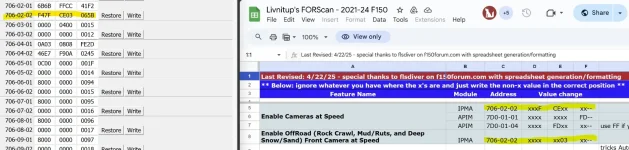
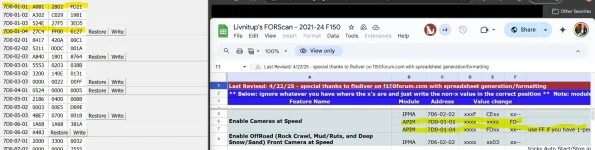
So, I gave it another shot this evening with no joy... Below are the screenshots of my inputs; however, once I hit that specific MPH - my front camera turns off. I also was unable to find anything remotely related to modifying in "easy mode" that would address this. Lastly, I also confirmed that I am not receiving the same IPMA error that you are getting.

If anyone has any suggestions on how to get Enable Camera at Speed + Enable Offroad Front Camera at Speed working for a '25 - I would greatly appreciate it.
 

Attachments

  • IPMA.webp
    IPMA.webp
    88.6 KB · Views: 33
  • APIM.webp
    APIM.webp
    87.2 KB · Views: 28
Just responded to your PM with some Canadian as-built info. Let me know if that doesn't work and we can try and dig a little deeper to figure out what is different on your truck. I have a running thread over on the 14gen forum and I have been able to get it sorted out for several different truck configurations. Hopefully we can get you sorted as well. You will be the first Canadian truck attempt I believe since its normally already active.
How did this work out? I have a 23 in Canada and am interested in trying this out.
 
So, I gave it another shot this evening with no joy... Below are the screenshots of my inputs; however, once I hit that specific MPH - my front camera turns off. I also was unable to find anything remotely related to modifying in "easy mode" that would address this. Lastly, I also confirmed that I am not receiving the same IPMA error that you are getting.

If anyone has any suggestions on how to get Enable Camera at Speed + Enable Offroad Front Camera at Speed working for a '25 - I would greatly appreciate it.
No go on my camera at speed either. Also, the AS/S disable did not work after the change either. 😕
 
For a US delivered 402A you get adaptive driving beams (lights move with the steering wheel) and Auto High beams (high beams turn completely off when another vehicle is detected).

The changes I mentioned earlier in this thread activate the glare free high beam feature that comes standard on Canadian delivered trucks. Take a drive at night with the default setup, then make the changes and go for a drive. The difference is significant. You will know it is working.

The high beams will now dim, dip, or divert to avoid other cars dynamically, while still providing light in areas where it doesn't effect other drivers.

I can 100% confirm it works on my truck (402A) and I do not get "flashed" by other drivers.
I have a 23 and I don't think this is enabled in Canada, Can anyone confirm If this can be done on the 23?
 
Last edited:
FYI Check your trucks before buying one. I bought one and went to install it and low and behold there was one installed. Thanks for the credit Ford... Why didn't you turn it on?

Next question,

Can anyone confirm the following are the setting for a 2023 to add the Motion Alarm (that got deleted) I bought the modual this is my first time using ForScan, I'm a little nervious.

PC
720-02-02 *xxx xx-- make sure PARGCF is enabled (mine was)
720-09-02 xxxx *x-- enable PAGR
720-11-01 xxx* xxxx xx-- Perimeter Alarm Text (mine is set to motion sensors)

BCM
726-02-02 x1xx x1xx xx-- Set Retrig config to enabled and security config to both
726-55-01 xxxx xx01 xx-- LIN CSM Config
726-65-01 xxxx xxx1 xx-- CSM Slave present

APIM
7D0-09-01 xxxx xxx* xx-- Enable PARGCF
7D0-09-02 xxxx xxxx *x-- Enable PAGR

Then do the BCM LIN new module configuration process.

Haven't got it to work yet, Might but the one I ordered in and try that... to be continued...
 
Last edited:
Next Question

Is there anyway to get Sync to boot up quicker? I thought I saw somewhere the Ford Logo at start up could be shut down?

Thanks,
 
Has anyone tried deleting the Auto start/stop on a 2025 yet? I've done clean disables on my previous trucks but it doesn't seem to work on this truck at all.
 
Has anyone tried deleting the Auto start/stop on a 2025 yet? I've done clean disables on my previous trucks but it doesn't seem to work on this truck at all.
 
Has anyone tried deleting the Auto start/stop on a 2025 yet? I've done clean disables on my previous trucks but it doesn't seem to work on this truck at all.
No luck via ForScan on '25 thus far. I am hoping that someone finds a way though (not looking to purchase anything aftermarket to disable).
 
No luck via ForScan on '25 thus far. I am hoping that someone finds a way though (not looking to purchase anything aftermarket to disable).
I’m not saying this is the case but perhaps Ford has somewhat locked down this feature from being disabled via FORScan or other aftermarket means and they’re forcing owners to actually use the button all the time.

Just a theory.
 
I’m not saying this is the case but perhaps Ford has somewhat locked down this feature from being disabled via FORScan or other aftermarket means and they’re forcing owners to actually use the button all the time.

Just a theory.
Could be right, ran it by Grok and it said due to the strict environmental regulations in Canada this was disabled even when going through forscan.
 
This is an option but for 130CAD it's atrocious. I need to do that, but one would ask, what's my annoyance worth.....
 
This is an option but for 130CAD it's atrocious. I need to do that, but one would ask, what's my annoyance worth.....
It's worth 130CAD. ASS is the most annoying "feature" on planet earth. Unsafe and destroys starters and lots of wear on the motor
 
I am trying to disable the Key Out Of Vehicle Chime which I find incredibly annoying. It is a chime that sounds inside the cab when I exit the running truck with the wireless key fob my pocket (Not to be confused with the double-honk). Has anyone had success disabling this chime on a 2024 F150 Tremor? Some googling says that this can be disabled in the vehicle settings but I have looked and I do not have the option available for some reason.

A working forscan as built address and code for this would totally make my day.
 
Double horn honk is what can be disabled through menus, not the chime you are referring to, that has to be done with Forscan, but I am not familiar enough with the 24+ models to tell you how
 

Recent Discussions

Back
Top