Escape Hatch
Well-known member
- Joined
- Jan 29, 2022
- Messages
- 1,948
- Reaction score
- 1,977
- Location
- North Carolina
- Current Ride
- 22 Tremor Stone Gray
- Current Ride #2
- 22 Aviator Reserve
Black Appearance PackageBig ass pumpkin
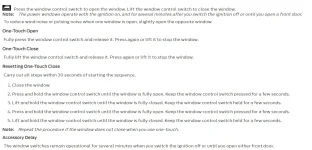
I went through the "quick fix" and thought it was fixed. A few days later it started doing it again. I just went through the procedure again but I have no doubt that at some point it will start all over again and I have never held the switch in the "fully closed" position other than when going through the fix procedure. Crazy thing is the problem seems to be random meaning I never know when it's going to happen. Annoying as hell when it does.Hey guys FYI - My youngest daughter was playing in the truck pressing all the window buttons and mine started doing the bounce-back thing. I didn't realize it at first, but she caused the bounce back issue by holding the buttons down. All you need to do is re-program your window settings. You can search for a youtube video or just search window bounce back in the truck onscreen manual for the reprogramming instructions. It's a quick fix once you figure it out.

The same thing happened to me. YouTube and looked good for a few days, then boom it was back. - RobI went through the "quick fix" and thought it was fixed. A few days later it started doing it again. I just went through the procedure again but I have no doubt that at some point it will start all over again and I have never held the switch in the "fully closed" position other than when going through the fix procedure. Crazy thing is the problem seems to be random meaning I never know when it's going to happen. Annoying as hell when it does.
View attachment 30211
Mine did it again today and I thought I fixed it yesterday. I guess I'll try disabling the Bounce-Back feature but that's pretty much what I've been doing anyway whenever this crap happens. Some of these safety nannies are more trouble than they're worth. POS!The same thing happened to me. YouTube and looked good for a few days, then boom it was back. - Rob

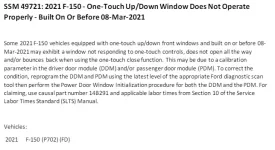
I also found this TSB on the NHTSA website. It's supposed to be for early '21 F-150s but it might be worth at least asking the dealer about. My truck was built in Jan '23. Makes you wonder if they had some old stuff laying around and used it just to get trucks out the door. That or they went back to the faulty calibration.Mine did it again today and I thought I fixed it yesterday. I guess I'll try disabling the Bounce-Back feature but that's pretty much what I've been doing anyway whenever this crap happens. Some of these safety nannies are more trouble than they're worth. POS!
View attachment 30232

Be careful but make a fist and while parked open the door and gently hit the inner metal part of the door with the outer (soft) of your fist in various places to shake the door and recreate the rattle.Today's peeve. It's developed a rattle noise somewhere on the passenger side door card or dash, of course where I cannot pinpoint or reach while driving....
I'm literally gonna have the dealer fix it because it's driving me NUTS
I'm gonna need a diagram of where to smack it....Be careful but make a fist and while parked open the door and gently hit the inner metal part of the door with the outer (soft) of your fist in various places to shake the door and recreate the rattle.
I just had the same (noise on that side) did the above and found the source and placed two thing rubber strips between the door and the metal.
You need the update that happened a few months ago. Mine stopped that after the update to read tire pressure on trailer. Don’t have exact update but that should get you a good ways on quick google search.The fact that anytime I try to look at anything in the trailer settings while driving, the entire dash, cluster and all, reset. So I have no idea how fast I’m going…
Is that a “bring it in” update or an OTA update? Because I think I’m up to date on the OTA stuff and it still does it.You need the update that happened a few months ago. Mine stopped that after the update to read tire pressure on trailer. Don’t have exact update but that should get you a good ways on quick google search.
Thanks you!Here’s the thread on it https://www.f150tremor.com/threads/dash-shuts-off.755/page-7
That might be due to CarPlay. I have noticed I get 1 notification from the truck and another from my phone, but it comes through since I am connected. I think that triggers another alert on the dash.I hate that it pulls up a not 1 but 2 warnings every time i start the truck when fuel is low. I wish you could turn that off. I can see the gauge, i dont need a warning that i have to clear not 1 time but 2 times.
Android auto.That might be due to CarPlay. I have noticed I get 1 notification from the truck and another from my phone, but it comes through since I am connected. I think that triggers another alert on the dash.
I actually found it!! Smacked the door a bunch with a palm/fist dead blow.... It was the plastic/rubber vent to the inside of the door cavity. WTFI'm gonna need a diagram of where to smack it....
I've poked and pressed all the plastic trims, and honestly they move and creak and flex and make way more noise than I would think is appropriate for a $70k truck... The whole door card can be flexed and moved pretty easily in fact. Of course it makes plastic creaking noises when one does this...
What warning? Haven't seen that and I use CC all the time every day.Has anyone figured out how to disable the warning / notification when you engage Cruise Control about the Adaptive Assist??